Difference between revisions of "Placement of Toolbars"
(Created page with "The toolbars are fixed at a certain position in the TMC. File:fixed_toolbar.png If needed, most of the toolbars can be freely placed as well. For this, the appropriate too...") |
|||
| (6 intermediate revisions by one other user not shown) | |||
| Line 1: | Line 1: | ||
| − | The toolbars are fixed at a certain position in the TMC. | + | The toolbars are fixed at a certain position in the TMC window by default. |
| − | [[File: | + | [[File:fixed_Toolbar.png|link=|alt=]] |
| − | If needed, most of the toolbars can be freely placed | + | If needed, most of the toolbars can also be freely placed: Click the toolbar on it's left end (where the dottet vertical line is) and drag it to, and drop it at the required location. |
| − | |||
| − | + | [[File:free_Toolbar.png|link=|alt=]] | |
| − | [[Category:Toolbar]] | + | |
| + | Return the toolbar to it's original location in the same way. | ||
| + | |||
| + | [[Category:Toolbar|link=|alt=]] | ||
Latest revision as of 17:05, 27 August 2013
The toolbars are fixed at a certain position in the TMC window by default.

If needed, most of the toolbars can also be freely placed: Click the toolbar on it's left end (where the dottet vertical line is) and drag it to, and drop it at the required location.
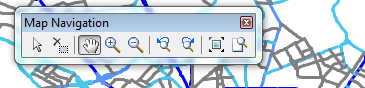
Return the toolbar to it's original location in the same way.

