Difference between revisions of "Gebiet erstellen"
| Line 1: | Line 1: | ||
| − | [[:category:Werkzeugleiste Bearbeiten|Werkzeugleiste Bearbeiten]] → Gebiet erstellen | + | [[:Category:Menü Bearbeiten|Menü Bearbeiten]] → Gebiet erstellen | [[:category:Werkzeugleiste Bearbeiten|Werkzeugleiste Bearbeiten]] → Gebiet erstellen |
[[File:gebiet-erstellen.png|link=|alt=]] | [[File:gebiet-erstellen.png|link=|alt=]] | ||
| − | |||
| + | This button is used for adding a new area to the [[Data Tree|data tree]]. | ||
| + | |||
| + | The new area is always added one level beneath the one you highlight/select by clicking on it. | ||
| + | |||
| + | '''Example''': If 'Areas' is highlighted, clicking the button will generate a new area on the same level as 'Europa'. If 'Schweiz is highlighted, the new area will be generated on the level of 'Tessin'. | ||
| + | |||
| + | |||
| + | [[File:gebiet-fenster.png|link=|alt=]] | ||
| + | |||
| + | |||
| + | In the setting '''General''' the area subtype can be chosen, as well as the name for the new area. In both cases this is done by double clicking on the space to the right of the corresponding title. | ||
| + | |||
| + | '''Area Subtype''' is chosen from a dropdown menu. It gives information about the hierachical importance of the area (A1: continent/A3: country). | ||
| + | |||
[[Category:Werkzeugleiste Bearbeiten]] | [[Category:Werkzeugleiste Bearbeiten]] | ||
| + | [[Category:Menü Bearbeiten]] | ||
Revision as of 15:50, 17 September 2015
Menü Bearbeiten → Gebiet erstellen | Werkzeugleiste Bearbeiten → Gebiet erstellen

This button is used for adding a new area to the data tree.
The new area is always added one level beneath the one you highlight/select by clicking on it.
Example: If 'Areas' is highlighted, clicking the button will generate a new area on the same level as 'Europa'. If 'Schweiz is highlighted, the new area will be generated on the level of 'Tessin'.
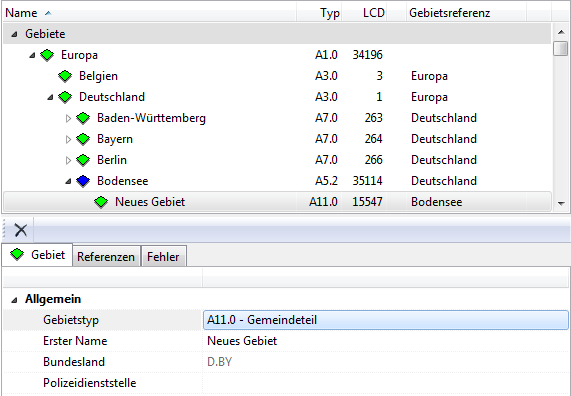
In the setting General the area subtype can be chosen, as well as the name for the new area. In both cases this is done by double clicking on the space to the right of the corresponding title.
Area Subtype is chosen from a dropdown menu. It gives information about the hierachical importance of the area (A1: continent/A3: country).
