Difference between revisions of "Structural Checks"
| (5 intermediate revisions by 2 users not shown) | |||
| Line 1: | Line 1: | ||
| − | + | [[:Category:Checks|'''Checks''' menu]] → [[Structural Checks]] | |
| − | Please note: Structural Checks cannot be performed by the user but are carried out automatically when [[Import Location Table Exchange Format|importing Location Tables from Exchange Format files]]. Therefore, if during an import routine an error occurs, the window shown below opens by itself. Any errors have to be directly solved in the import data, not in tmcStudio. Tables or files, respecively, and rows affected by the error are displayed in the Structural Checks window. | + | Please note: |
| + | *Structural Checks cannot be performed by the user but are carried out automatically when [[Import Location Table Exchange Format|importing Location Tables from Exchange Format files]]. | ||
| + | *They are mandatory and have to be passed by all import files, otherwise the import is interrupted. | ||
| + | *Therefore, if during an import routine an error occurs, the window shown below opens by itself. Any errors have to be directly solved in the import data, not in tmcStudio. | ||
| + | *Tables or files, respecively, and rows affected by the error are displayed in the Structural Checks window. | ||
| − | + | To learn about '''Status''' symbols ([[file:icon_pass-test.png|alt=|link=]]/[[file:icon_fail-test.png|alt=|link=]]), filtering checks, viewing check details or exporting check results to Excel see: '''[[Semantic Checks]]''' | |
| + | |||
| Line 13: | Line 18: | ||
[[Category:Checks]] | [[Category:Checks]] | ||
| + | [[Category: Export]] | ||
| + | [[Category: Import]] | ||
Latest revision as of 17:18, 3 December 2013
Checks menu → Structural Checks
Please note:
- Structural Checks cannot be performed by the user but are carried out automatically when importing Location Tables from Exchange Format files.
- They are mandatory and have to be passed by all import files, otherwise the import is interrupted.
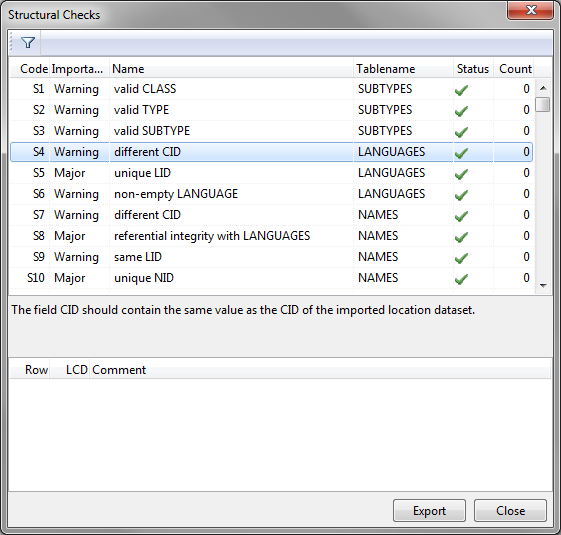
- Therefore, if during an import routine an error occurs, the window shown below opens by itself. Any errors have to be directly solved in the import data, not in tmcStudio.
- Tables or files, respecively, and rows affected by the error are displayed in the Structural Checks window.
To learn about Status symbols ( /
/ ), filtering checks, viewing check details or exporting check results to Excel see: Semantic Checks