Difference between revisions of "Search Tree"
| (One intermediate revision by the same user not shown) | |||
| Line 6: | Line 6: | ||
| − | The button '''show/hide search tree''' displays or hides the search panel above the [[Tree | + | The button '''show/hide search tree''' displays or hides the search panel above the [[Data Tree|data tree]]: |
[[File:search-panel.png|link=|alt=]] | [[File:search-panel.png|link=|alt=]] | ||
| + | |||
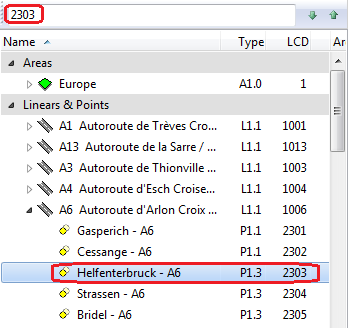
Type in a search keyword you wish to find in the data tree (for instance: an area name, a street name, type or location number), either press the ENTER key or click the green arrow buttons on the right hand side of the search field. This will browse through the data tree and highlight and display any matching records on the map. | Type in a search keyword you wish to find in the data tree (for instance: an area name, a street name, type or location number), either press the ENTER key or click the green arrow buttons on the right hand side of the search field. This will browse through the data tree and highlight and display any matching records on the map. | ||
| − | |||
[[File:SearchTree.png|link=|alt=]][[Category:Button]] | [[File:SearchTree.png|link=|alt=]][[Category:Button]] | ||
Latest revision as of 17:53, 3 December 2013


Keyboard shortcut: Ctrl + F
The button show/hide search tree displays or hides the search panel above the data tree:

Type in a search keyword you wish to find in the data tree (for instance: an area name, a street name, type or location number), either press the ENTER key or click the green arrow buttons on the right hand side of the search field. This will browse through the data tree and highlight and display any matching records on the map.