Options


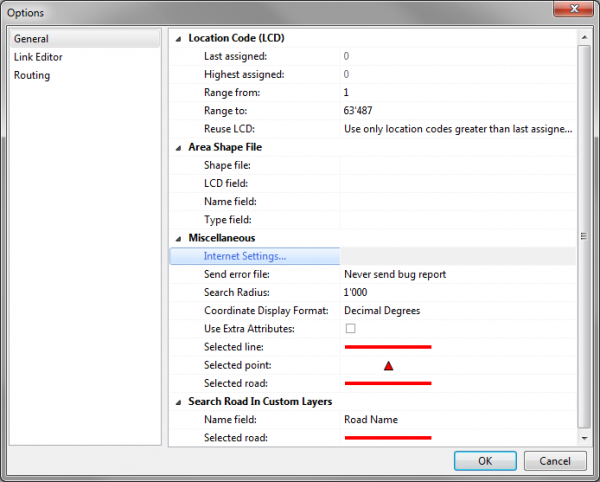
The Options window consists of up to three sections (depending on your access level), where you can manage global settings for tmcEditor:
General
Coordinate Display Format
Here you can choose if the coordinates displayed in the bottom right hand corner of the screen should be displayed in decimal degrees or in minutes and seconds.
Link Editor
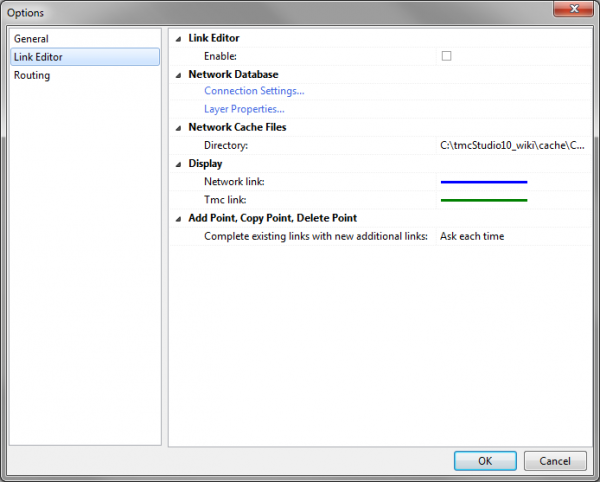
Link Editor → Enable
- When using Link Editor this option should be enabled in order to activate the corresponding buttons and functions.
Network Database
→ Connection Settings
- If you imported the network from a shapefile (see Import Network Database From Shapefile), all settings should already be in place. If not, click Connection Settings to open the corresponding window and enter the connection details according to the following instructions.
- Database Type
- Select Firebird (lokal) only!
- Database
- Click on the folder button
 to select the database (file format ist FDB).
- Click on the folder button
- User name
- Has to be sysdba.
- Password
- Has to be masterkey.
→ Layer Properties
- Opens the window Edit Layer Configuration File where you can configure the map display of the network layer.
Network Cache Files → Directory
- Click on the folder button to define where the cache file should be stored.
Display
→ Network Link: Define the color and pattern of network links on the map.
→ TMC Link: Define color and pattern of TMC links on the map

