Segment erstellen
Menü Bearbeiten → Segment erstellen | Werkzeugleiste Bearbeiten → Segment erstellen

Um eine bestehende Strasse in mehrere Abschnitte zu unterteilen, können neue Segmente erstellt werden. Dazu wird die gewünschte Strasse in der Objektliste ausgewählt und mit Klick auf den Button ein neues Segment erstellt, das als Unterkategorie der Strasse eingefügt wird.
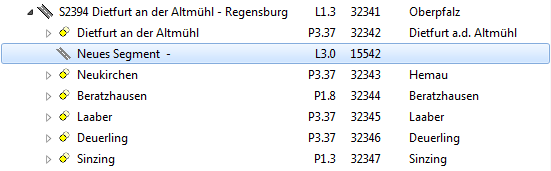
Once a new segment has been added, three names have to be assigned:
Road name: The name of the road the segment belongs to.
First name: The name of the location or intersection where this segement starts.
Second name: The name of the location or intersection where this segment ends.
 Important Advice
- As with the roads, one individual segment should not contain more than approximately 50 points. If there are more, it can take too much time to load the data when selecting the element.
- If you choose to segment a road, all points need to sorted into segments.
- Caution when deleting a segment that contains points. Deleting the segment will automatically also delete all the points it contains!
To add points to a segment, drag and drop the point on the name of the segment. This will add the point to that segment.
To move the point out of the segment, drag and drop the point on the name of the road.
