Edit Visibility Settings

The visibility settings are are manages by the window opened when clicking the button Edit Visibility Settings.
By working with this function, visibility is changed regarding the and and the map.
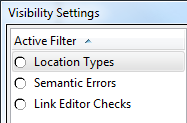
- Location Types
- The different levels of the areas, lhe linears and the points can be selected, respectively deselected in order to show or hide them on the map and in the tree.
- Semantic Errors
- Activate the Filter Semantic Errors means, that all the errors found in the file are shown. When selecting them, they are directly shown in the tree and can be edited.
- Link Editor Checks
- ???
